
Active Tasks Tab
The processing tasks for a feed, pipeline or folder, finished ones included, and how long they stay listed.
A processor filter turns the streams it matches into tasks, each one a unit of work for one node. The Active Tasks tab lists them. Despite the name it is not limited to running tasks: finished ones stay listed until they are cleared away.
| Opened from | Lists tasks for |
|---|---|
| A feed | Streams of that feed, whichever pipeline processes them. |
| A pipeline | That pipeline, whichever feed the streams come from. |
| A folder | Feeds and pipelines in that folder and below it. |
Show Tasks on the Processors tab opens the same list for one filter.
The tab is only shown to users with Manage Processors.
The two lists
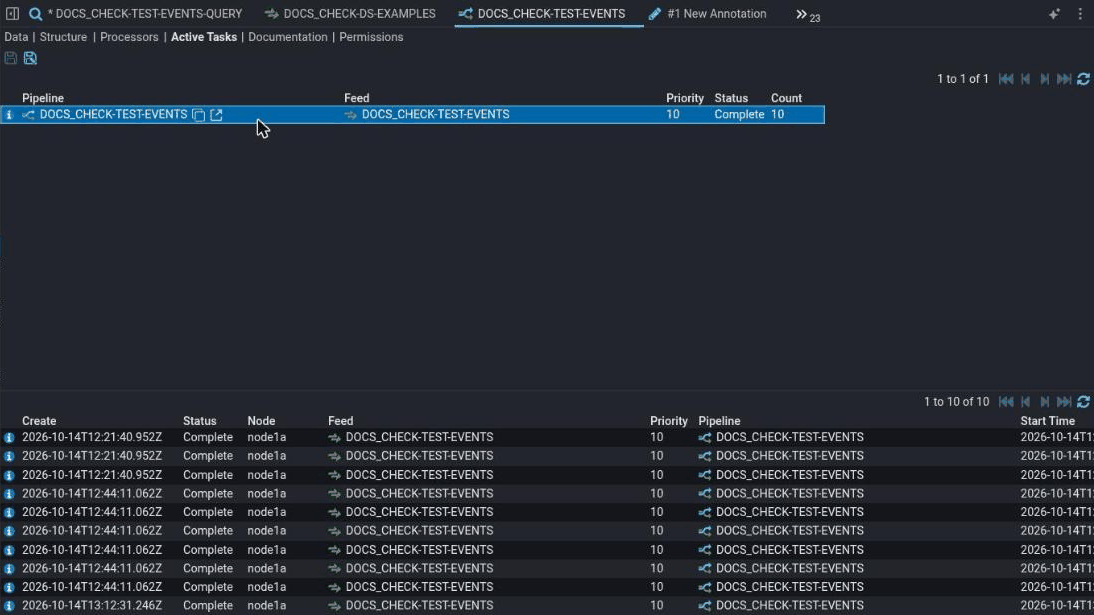
The summary : One row for each combination of pipeline, feed, priority and status, with a count. A feed with some tasks complete and some still queued has two rows.
The tasks : The tasks behind the summary row you clicked: when each was created, its status, the node it ran or is running on, the stream it processes, and when it started and ended.
Neither list has any buttons beyond paging and refresh. Tasks are managed through their filters, not directly.
Task status
| Status | Means |
|---|---|
Created | The task exists but has not been queued yet. |
Queued | It is waiting for a node to take it. |
Processing | A node is running it. |
Complete | It finished. Look at the stream's output, including any Error stream, for the result. |
Failed | It could not be processed. |
Complete means the task ran, not that the data was good. A task that wrote only an Error stream is still Complete.
Why tasks disappear
Finished tasks are removed by the Processor Task Retention job once they are older than stroom.processor.deleteAge, one day by default. Filters that have finished their work, such as a completed reprocess filter, are cleared away on the same schedule.
So an empty Active Tasks tab for a pipeline that processed data last week is normal. To see what was processed, look at the output streams on the Data tab, which are kept on the data's own retention.