
Reprocess Data
How to re-run a pipeline over data it has already processed, and what it does and does not clean up after itself.
Reprocessing re-runs a pipeline over streams that have already been through it. You need it whenever the pipeline was wrong and the output it produced is wrong with it: a translation that dropped a field, an XSLT that matched nothing, a schema that has since changed.
The raw data is untouched by any of this. Processing never consumes its input, it only produces new streams alongside it, which is why reprocessing is possible at all.
The procedure
- Fix the pipeline, and prove it. Use the Stepper on one record before reprocessing a million. Reprocessing with a pipeline that is still wrong costs the same as reprocessing with one that is right.
- Find the streams to reprocess. Filter the feed's data list down to the output streams (
EventsorError) for exactly the period you mean. This selection is the blast radius. Stroom works back from them to the source streams they were made from. - Plan for output that has left Stroom. Old output streams are replaced for you, but index documents, statistics and anything sent to another system are not. See the trap below.
- Reprocess the selection. Tick the streams, then click Process , the first icon on the data list toolbar. In the Create Processors dialog, tick Reprocess data, then select OK. Stroom builds a temporary processor filter for those streams and queues them.
- Check the summary. The Confirm Reprocess dialog says how many streams the selection covers, of which types, from which feeds and pipelines, and over what range of create times. Confirm it, and Stroom reports
Added reprocess filter toeach pipeline it found.
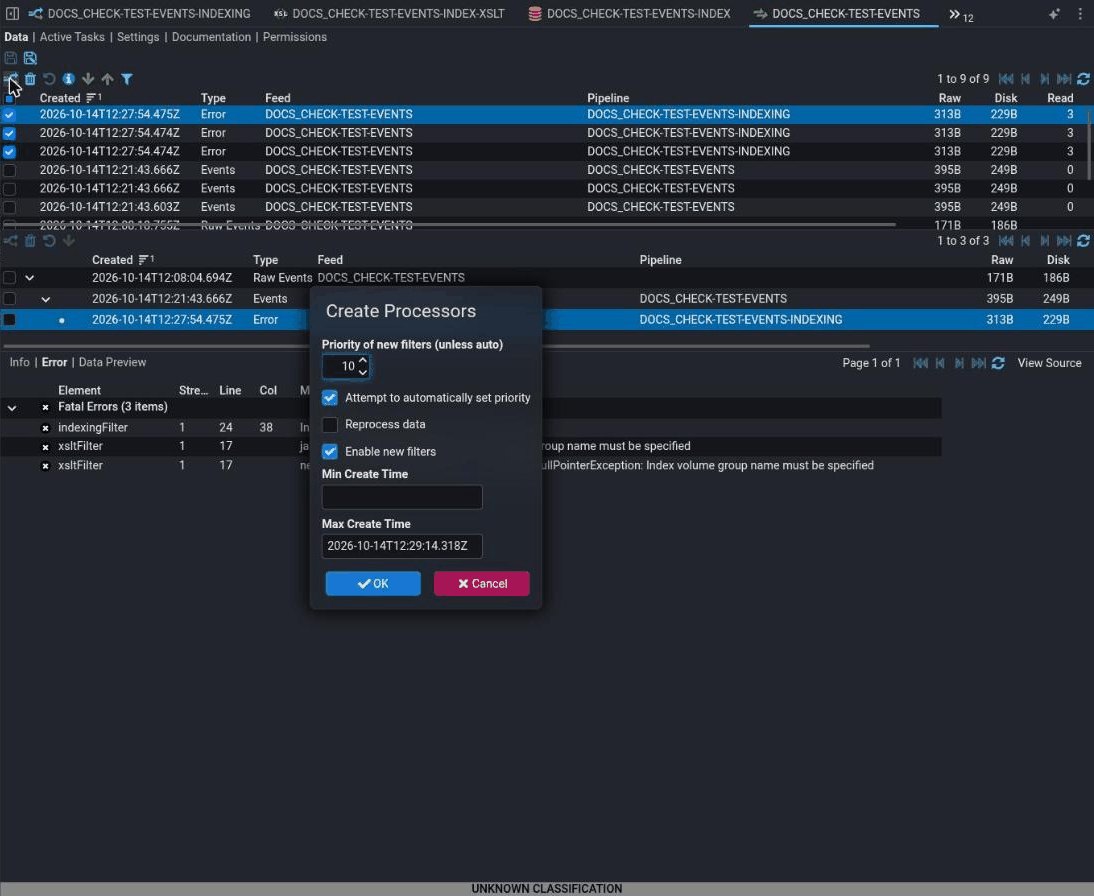
The dialog's other settings:
Priority of new filters and Attempt to automatically set priority : The priority of the temporary filter. With automatic priority, it takes the priority of the processor's existing filter.
Enable new filters : Ticked by default. Untick it to create the filters disabled and enable them yourself later.
Min Create Time and Max Create Time : Limit the source streams by when they were created. Max Create Time defaults to now.
Fails silently
With Reprocess data unticked, the selected streams are not reprocessed: they become the input.
Stroom asks you to choose a pipeline and runs the streams you ticked through it, so selecting Events or Error streams processes the output, not the source it came from. Tick Reprocess data to work back from the selection to the source streams and re-run the pipelines that made it. This is the box to tick for any stream that has already been processed.
How long: not immediate
Reprocessing is ordinary processing and inherits its latency: the task creator polls, the tasks queue, and the work competes with live ingest for the same capacity. Minutes to hours, in proportion to the volume selected.
Selecting a year of data and expecting it in ten minutes is the common mistake. Check the selection summary before confirming: it tells you how many streams you are about to re-run.
Check it worked
New output streams appear on the feed, with create times of now and the same parent streams as the old ones. Open one and confirm the output is what the fix was meant to produce.
The check that matters most
The output stream count matches the input count you selected, and one of them is right.
Count answers "did it all run". Content answers "did it run correctly". Neither answers the other.
This does not prove it worked
An Events stream appearing does not mean the fix worked. A pipeline that still matches nothing produces a valid, empty output stream, which looks the same in a list as a correct one. Open it.
The absence of Error streams does not mean the output is right. Most translation mistakes are not errors; they are silence.
Fails silently
Reprocessing cleans up old output streams, but not what was built from them.
When a source stream is processed again, Stroom marks the output streams that the same pipeline made from it last time as deleted, once the new run finishes. You do not need to delete them first. What it cannot take back is output that has already left the stream store: documents in a Lucene index are added again rather than replaced, statistics are counted again, and files or messages sent to other systems are sent again. Indexes double, statistics double, and dashboards are wrong in a way that is easy to misread as a data problem.
Before reprocessing a large selection that is indexed, reset the index. For exports, pause or redirect the destination while the reprocessing runs.
If it isn't working
In order. Each step rules out a class of cause, so don't skip ahead.
- Did anything queue at all? Check the processor's tasks. If nothing queued, the selection matched no streams: check the filter criteria and the time range you selected.
- Are there new
Errorstreams? Read one. A fix that introduced a new fault shows up here, and it will have failed on every stream rather than one. - Is the output still wrong in the same way? The pipeline change may not have been saved, or the processor may be using an inherited parent pipeline that still holds the old version. Check what the element actually points at.
- Are search counts roughly double? The index still holds the documents from the first run. See the trap.
- Is it simply still running? Compare the processor filter's tracker against the size of the selection before concluding it has stalled.
When reprocessing is not the answer
If new data is processing and only old data was missed after a processor filter's criteria were changed, the pipeline is probably fine and the filter's tracker had already moved past those streams. That is a different fix: see Reset a processor filter.